Tools

Tools

Tools I use in my own work. The SCP Builder, the IAM Builder and the VPC Builder are free (with a free account) and run entirely in your browser; I use the RKPC Toolkit in my reviews.

SCP Builder

Free, with an accountIn your browserDutch and English

Pick the guardrails most AWS organizations use, set how far each one reaches and get policies that fit within the AWS limits. With starting points per OU, exemptions for trusted roles and a summary you can print.

  • 26 guardrails in 9 categories, with starting points for root, production, sandbox and more
  • Also an RCP (data perimeter), an EC2 declarative policy, an AI opt-out and a backup policy
  • Output as JSON or Terraform; import existing SCPs and extend them
  • An A4 summary for your team or client

A starting point, not a guarantee: every environment is different. Review the result and test it in a sandbox OU first, before you attach it.

You sign in with a free account (name, company and email address); I see which tool you open, never what you make with it. What you make stays in your browser: nothing is sent or stored on the website, and the tool asks for no access to AWS. You download the policies yourself.
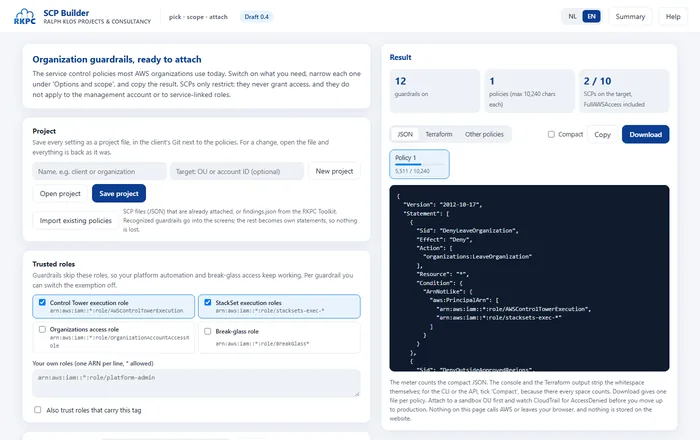
Screenshot of the SCP Builder

IAM Builder

Free, with an accountIn your browserDutch and English

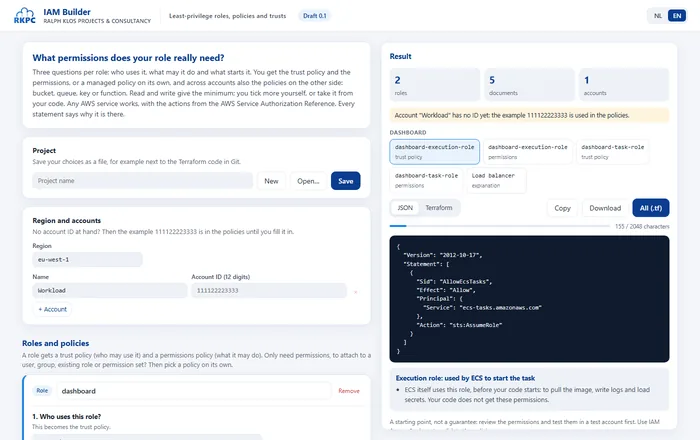
Three questions per role: who uses it, what may it do and what starts it. You get the trust policy, the permissions and, across accounts, the policy on the other side. Read or read and write gives the minimum that actually works; you tick more yourself, or take it from your code or from CloudTrail.

  • Any AWS service, with the actions from the AWS Service Authorization Reference
  • EC2, ECS, Lambda, GitHub Actions, other accounts, SSO and over 30 AWS services as the user
  • Permissions from your code (boto3, JavaScript SDK, AWS CLI) or from CloudTrail logs
  • Output as JSON or Terraform, with why each statement is there

A starting point, not a guarantee: review the permissions and test them in a test account first. Use IAM Access Analyzer to validate the policies.

You sign in with a free account (name, company and email address); I see which tool you open, never what you make with it. What you make stays in your browser: nothing is sent or stored on the website, and the tool asks for no access to AWS. Pasted code and logs do not leave your browser either.

Screenshot of the IAM Builder

VPC Builder

Free, with an accountIn your browserDutch and English

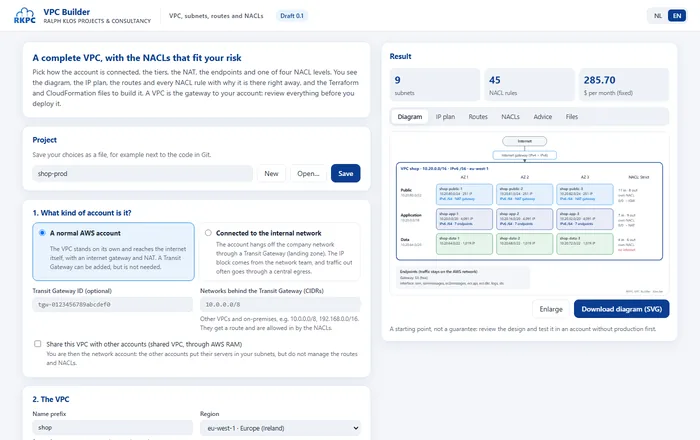
Pick how the account is connected, the tiers, the NAT, the endpoints and one of four NACL levels. You see the diagram, the IP plan, the routes, the NACL rules, advice and the fixed cost straight away, and get the design as Terraform and CloudFormation.

Demo: every choice, then the diagram, the IP plan, the routes, the NACLs, the advice and the files
  • A public, application and data tier across at least 2 zones; the data tier never has internet
  • A normal account or connected through a Transit Gateway, with or without central egress
  • Endpoints with a policy for your organization, flow logs with KMS and Block Public Access
  • Review an existing VPC with a script that only reads

You deploy the files yourself, at your own responsibility: a wrong setting can open your account. That is why you confirm this before the first use. Read every file and test in an account without production first.

You sign in with a free account (name, company and email address); I see which tool you open, never what you make with it. What you make stays in your browser: nothing is sent or stored on the website, and the tool asks for no access to AWS. You download the files yourself.

Screenshot of the VPC Builder

RKPC Toolkit

PaidRead-onlyMultiple accounts

A thorough review of security, costs, the basic setup and AI, across all your AWS accounts. I run it with a role that can only read, and go through the report with you.

  • 84 checks: 42 for security, 32 for costs and 10 for the basic setup
  • A report in Dutch or English, with priorities and concrete steps
  • A maturity questionnaire of 76 questions, and a progress report after the improvements

The role does not read your data (files, secrets, logs, databases) and cannot change anything. Every call is in your CloudTrail, and after the review you remove the role.

In development

From your code to a safe rollout on AWS

PaidIn your browserYour code stays with you

I am working on RKPC CloudReady, a paid tool that builds on the IAM Builder and the SCP Builder. It runs in your browser, with an account on this site. You pick your project folder, and the tool finds every AWS call in the code. From that it creates the role with the least privileges, and everything you need to roll it out.

A demo of a minute and a half, with a made-up test project
  • Reads your whole project: Python, JavaScript and TypeScript, shell, PowerShell, Terraform and CloudFormation. Java, Go and .NET will follow.
  • A step where you add what the code does not show: an ALB or API Gateway in front, Lambda or ECS with ECR, SES, the names and the accounts. Only when all is complete does the tool create the files.
  • A role, a least-privilege policy and a trust policy, with the line of code behind every permission
  • Install scripts for PowerShell and bash (macOS and Linux) that first show what they would do and ask for confirmation
  • Terraform with an explanation, CloudFormation, AWS CDK, and pipelines for Jenkins, GitHub Actions, GitLab, Azure DevOps and Bitbucket
  • A scan of your dependencies for known vulnerabilities (CVEs)
  • A diagram of your project

Your code never leaves your computer: the browser reads the folder, nothing is uploaded. The tool does not connect to AWS itself and never asks for keys: you run the scripts yourself.

Would you like to be among the first to use it, in a pilot with a few customers? Send me a message.

Rather have me take a look?

I review your guardrails and put together a set that fits your organization.